Home · Deposits & Payments
Rentals · Events · Programs

Deposits & Payments

Paying a deposit or balance for an event, rental, or program? You're in the right place. Pick PayPal or Venmo below and you'll be done in a couple of minutes.

How It Works

Every event here is a little different, so there are no set amounts on this page. Pay the amount from your booking conversation with us — the deposit or balance we agreed on. Not sure what you owe? Call us at (830) 379-0933 and we'll sort it out.

Please note: a payment does not secure your date. Your date is only secured once a signed contract has been received by the Red Barn. If you haven't talked with us yet, start with an inquiry — don't send a payment.

One thing that matters: in the payment note, include your name and your event date. That's how we match your payment to your booking.

Two Ways to Pay

Both go to the same place. Use whichever you already have on your phone — scan the code or tap the button.
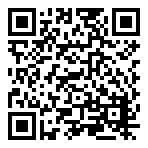
Scan to pay via PayPal

PayPal

Pay by card or PayPal balance. On the payment screen, choose "Other" to enter your exact amount — then add your name and event date in the note.

Pay with PayPal
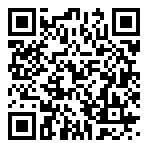
Scan to pay via Venmo

Venmo

Scan the code or tap the button, enter your amount, and put your name and event date in the payment note. That's it.

Pay with Venmo

Looking to support the mission instead? Every donation funds ag education — visit our Donate page.